Web Status Page
Real-time visibility into your merge lanes with GitHub OAuth authentication.
Overview
GitQueue provides a web-based status page where you can view PRs that are actively queued or processing in your repository's merge lanes. The status page shows row metadata, gate status, and recent PR activity in lane-priority order.
Authentication Required: The status page uses GitHub OAuth for authentication. You must be logged in to GitHub and have read access to the repository to view its lane status.
Accessing the Status Page
There are several ways to access your repository's status page:
- From PR Overview Comments: Both general and queued overview comments include a link to the repository queue page
- Direct Repository Link: Open the repository-scoped queue page URL shared by GitQueue
Authentication
The status page uses GitHub OAuth to authenticate users. This ensures that only users with appropriate access to the repository can view its merge lane status.
GitQueue stores the GitHub OAuth token in a separate short-lived HttpOnly cookie for the status page. This flow is independent from any Payload CMS admin authentication.
Authentication Flow
- Navigate to the status page URL
- If not authenticated, you'll be redirected to GitHub OAuth login
- Authorize GitQueue to access your GitHub account
- GitQueue stores a 1-hour HttpOnly cookie and redirects you back to the status page
Access Verification
- • GitQueue verifies repository access before loading lane data
- • Users without repository read access are denied
- • If GitHub returns an access error, the cookie is cleared and re-authentication is required
Security Note: GitQueue does not store your GitHub credentials. Authentication is handled entirely through GitHub's OAuth system.
Interface Overview
The status page is organized by merge lanes and shows active PRs in priority order.
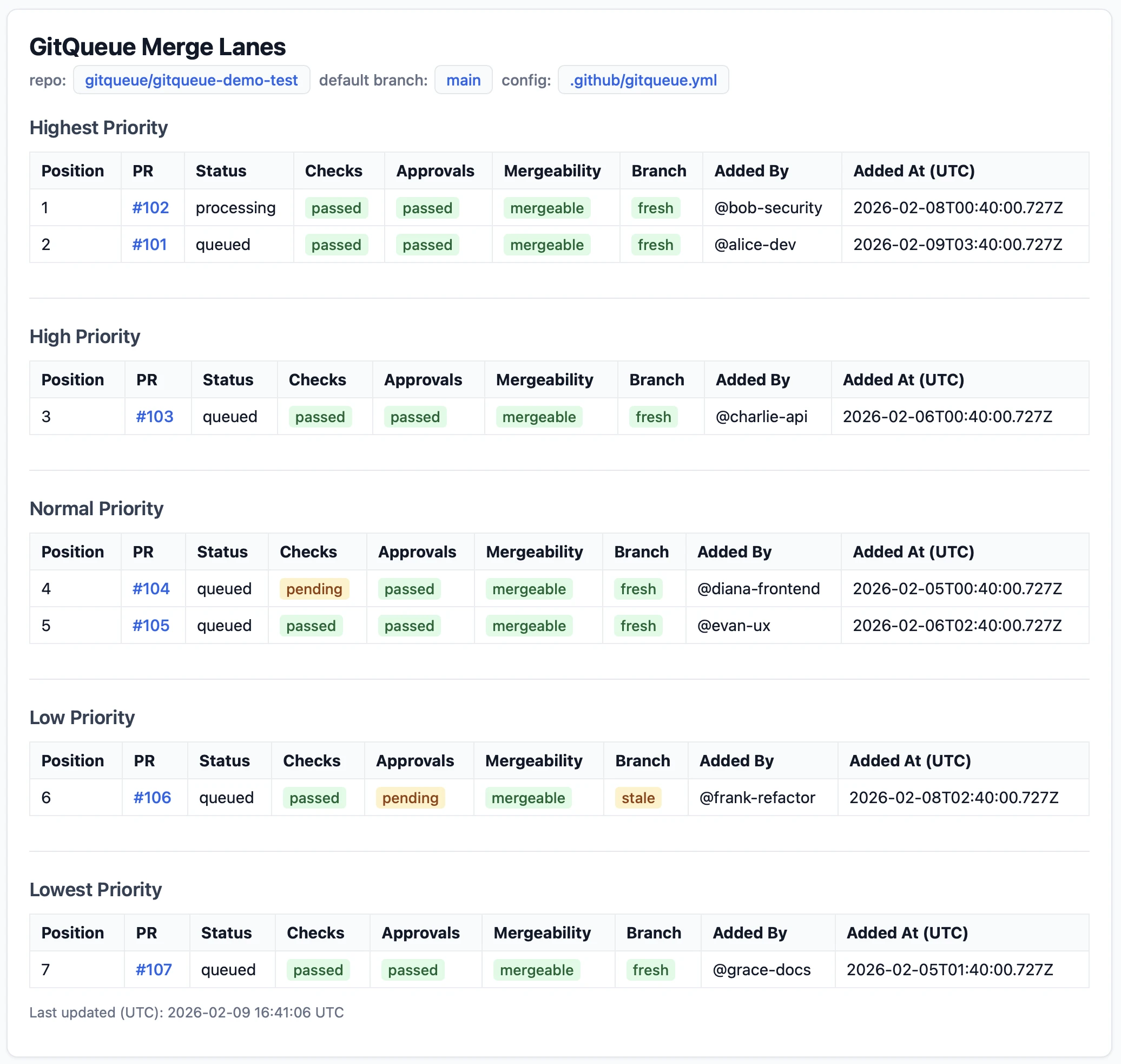
Page Sections
Header
Shows repository name and last update timestamp
Lane Sections
Five sections for each merge lane (highest, high, normal, low, lowest)
PR Cards
Each PR shows lane position, gate status, and activity log
Viewing PRs
Each PR in active lanes displays comprehensive information about its current state.
PR Information Displayed
| Field | Description |
|---|---|
| PR Number | Clickable link to the PR on GitHub |
| Lane Position | Position across active lanes in priority order |
| Merge Lane | Current lane (highest, high, normal, low, lowest) |
| Status | Active processing state (queued or processing) |
| Queued By | Actor who added the PR to a lane |
| Queued At | Timestamp when the PR was queued |
Gate Status
Each PR shows the current state of all three gates. Gates can be pending, pass, warn, or fail, and failing gates include a reason.
Gate Indicators
Gate requirements are satisfied
GitQueue can continue, but the PR is not fully clean yet
Gate requirements are not met
Status is being evaluated or GitHub data is not resolved yet
Three Gates
- Checks - Derived from GitHub merge state plus the required status and check contexts. It can be pending, pass, warn, or fail depending on what GitHub reports.
- Approval - Passed when GitHub reports
reviewDecisionas approved or otherwise non-blocking. - Freshness - Derived from GitHub REST pull request data and compare results. Warn usually means the branch is behind; fail includes the last failure reason in the table.
Activity Logs
Each PR includes an activity log showing its processing history. This helps you understand what GitQueue has done and why.
Activity logs are expandable and show up to 20 recent events per PR.
Log Entry Information
- Timestamp: When the recorded event occurred
- Actor: Who triggered or caused the event
- Message: Human-readable summary of what GitQueue did or observed
Activity Deduplication: If GitQueue evaluates a PR multiple times with the same result, it updates the timestamp instead of creating duplicate log entries.
Filtering & Navigation
The status page focuses on quick scanning instead of heavy controls. The key navigation aids are stable row ordering, direct GitHub links, and a clear generation timestamp.
Navigation Features
Stable Priority Ordering
Rows are ordered by lane priority first, then by each lane's active processing order, so you can quickly see what GitQueue will attempt next.
Direct Links
Click on any PR number to open the PR on GitHub in a new tab.
Last Updated
The page shows when it was last generated. Refresh your browser to pull the latest lane snapshot after new GitHub activity.
Empty State
If no PRs are actively queued or processing, the page shows an empty state instead of lane rows.